 ArchLens
Intelligent System Design
See how all the pieces connect. And bring the lens closer to the details.
Architecture is not drawing boxes connected by arrows. In ArchLens, every connection tells what goes through it, in which direction, at what volume and how long it takes. And the diagram starts raising the questions the design needs to answer.
Start drawingAn efficient architecture makes the most of every element in the ecosystem. And it is in the details that it wins or loses.
An arrow doesn't answer the hard questions
In most tools, a database is a rectangle with an icon and a connection is just a line. The drawing looks nice and passes the review, but it postpones exactly the decisions that matter. And they charge their price during development:
- Which resource is being called? Does it already exist on the provider, ready to use?
- Does this call read or write? Which way does the data flow?
- Does it really need to be a synchronous call?
- How many requests per second go through here?
- How much can this component handle before it saturates?
- What happens to whoever depends on it when it slows down?
- What is the alternative behavior or path when something fails?
- If traffic triples, what changes in the system?
See it in action
This example is a simplified Discord bot using n8n, AI, a queue, a cache, a database and Pix payments. Day to day, the diagram is clean: components, connections and the resources each one uses, ready to present and document.
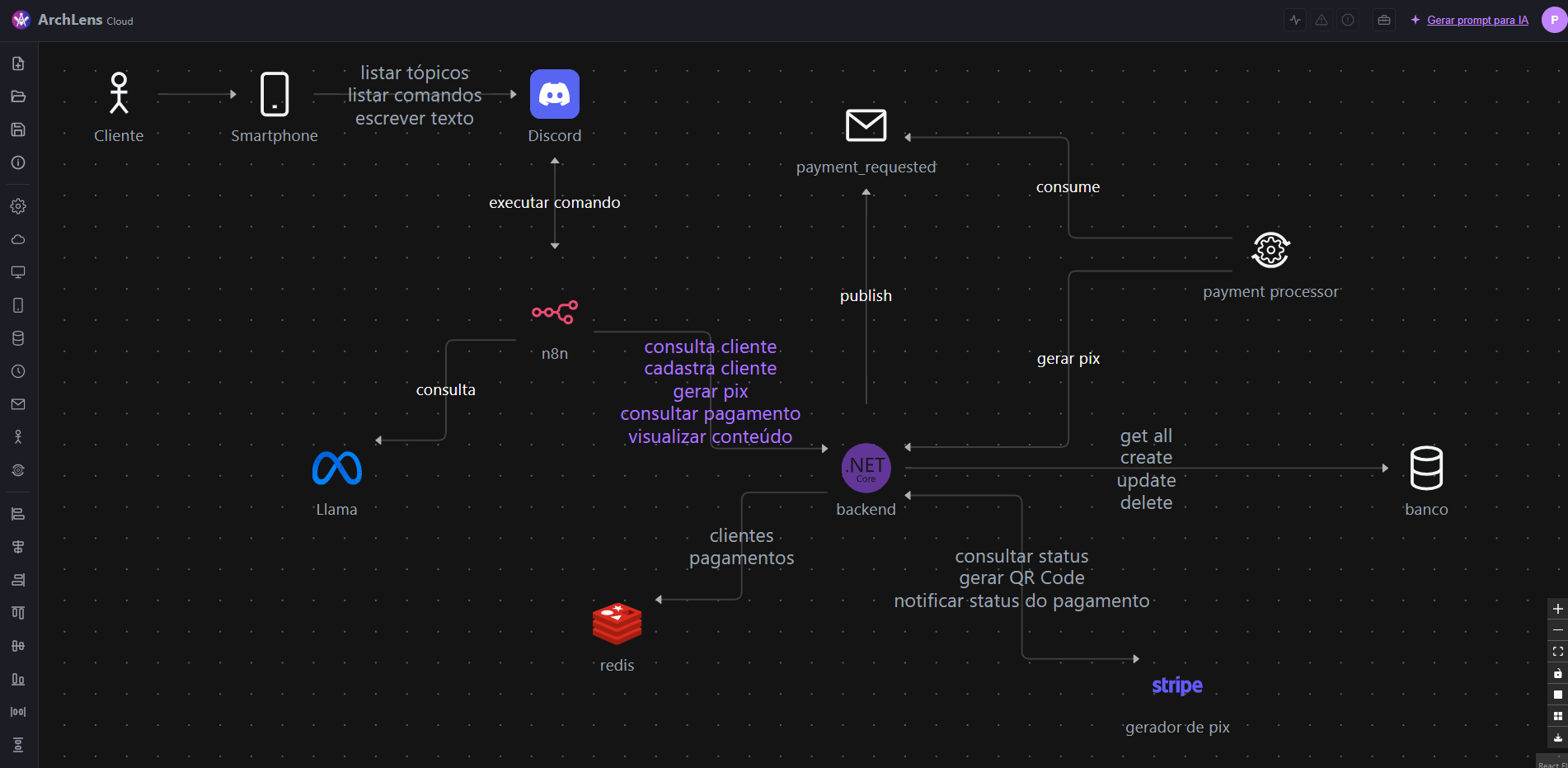
A solid architecture stands on its own without depending on someone putting out fires.
When you want to analyze it, just turn on the flow simulation. Packets start running along the tracks in the direction the data flows, at the speed of the throughput, and overloaded or slow components go into an alert state.
Connect the dots. For real.
Neither a loose drawing nor a diagram written in code. In ArchLens you visually build a model of the architecture, and the details are part of it: every piece and every link carry what it takes to understand how they actually communicate.
Connections are not just lines with a label. They are contracts: they describe what a service offers and what the client must provide to use it.
Resources with a contract
Each component declares what it offers: endpoints, topics, queries. With protocol, method, whether it reads or writes and how long it takes to respond.
Connections that tell what goes through them
Who calls whom, which provider resources it uses, at what throughput, whether the flow is the basic or the alternative one, and whether the communication goes both ways.
Learn the language of architecture while you draw
Component, stereotype, design, technology: these are terms that raise doubts right when it's time to put them into practice. In ArchLens, each one shows up the moment you need to decide, with concrete examples. The concept stops being theory and becomes a choice.
Component
What the piece is in the architecture: a service, a storage, a broker, a scheduled job, an actor. And how much it can handle: the capacity of each instance, in requests per second.
Stereotype
The specific role of the component. A storage can be a database, a cache or a data lake; a service can be an API or a web application.
Design
The internal style of the component. In a service: Clean, Hexagonal, CQRS, MVC. In a database: relational, document, key-value.
Technology
The concrete product behind the piece, from a catalog with more than a hundred options. Picking the technology already suggests the right stereotype and icon.
The options follow your choices: a database only offers database designs, a service only offers service designs. Each decision reinforces the concept, and the vocabulary sticks.
The magnifying lens
Details are not decoration. They carry the fundamental concerns of architecture: requirements, constraints and efficiency.
Requirements
What the system needs to meet: the expected traffic on each connection and the resources each client needs to consume.
Constraints
The limits it operates within: the capacity of each component and the time each resource takes to respond.
Efficiency
How it uses what it has: the load each piece receives compared to what it can handle, and who puts too much pressure on its provider.
-
Traffic in motion
Packets travel along each connection in the direction of the data, faster where the throughput is higher.
-
Load and capacity
Each component compares what it receives with what it can handle, and goes into alert when it gets close to the limit.
-
Slowness and impact
A slow resource makes the component critical, and the impact spreads to whoever depends on it.
-
What if traffic grows?
Multiply the traffic of the whole diagram and see how the load spreads, without changing the drawing.
What your architecture costs
Enter what each component costs per month and see, in the editor's header, the cost of the whole architecture, added up as you draw.
Component by component
The monthly cost sits with the piece it pays for. Change the drawing and the total follows.
The why behind each number
Next to the cost, record what justifies it: cloud, region, instance, replicas, licenses. The conversation moves from the spreadsheet to the diagram.
Cost next to load
With cost alongside traffic and capacity, it's easy to see which pieces weigh on the total and which deserve a second look.
Available on every plan, including Free. The values are the ones you enter: ArchLens doesn't look up cloud prices.
Where your project lives
To draw in ArchLens you sign in with an account, and that account is what keeps your work. On the Free plan, the project lives in your account, in the cloud. On Pro, you choose, for each project, between your private cloud and an .archlens file on your computer.
Free: kept in your account
While you draw, the project is saved automatically to the cloud, tied to your login. There is no file to download: its place is your account.
Pro: in the cloud or on your machine
Save it to your account and reopen it from wherever you are, or create an .archlens file that ArchLens keeps saving to on its own every minute.
Pro: take it wherever you need
The file is yours: you can keep it next to the code, send it to the team or attach it to the documentation.
Plans
Start for free and switch plans when the way you work calls for it. Plans differ by who uses them and how they collaborate.
Free
To try it out
R$ 0
- 3 projects, kept in your account
- Architecture cost
- AI prompt
- PNG image with a watermark
- Opens other people's projects in read-only mode, with simulation
- Every icon in the catalog
- Shares by read-only link
Pro
For those who work alone
R$ 10One-time payment by Pix. Whoever pays now gets lifetime access.
- Unlimited projects
- In your private cloud or in an .archlens file, per project
- PNG image without a watermark
- Your projects are not used in studies
- Shares by file and by several links, seeing who entered
Team Coming soon
For teams that edit together
Per editorReaders don't pay.
- Everything in Pro
- Shared cloud, groups and permissions
- Shared online editing
Enterprise Coming soon
For companies with contract requirements
Contact us
- Everything in Team
- Single sign-on (SSO)
- Contract and data guarantees
Sharing: whoever receives a project needs an account, at least Free. On Free, other people's projects always open in read-only mode: you can view and simulate, never edit. On Pro and above, the recipient reads or edits, according to the permission set by whoever shared it.
Draw fewer boxes. Understand the system better.
Build your architecture with the details that matter and discuss the system based on how it really communicates.
Start drawing